The Night a Fire Drill Exposed the Real Problem
At 11:40 PM, an alarm went off at a 24-hour data center co-location facility. It wasn't a real fire. A contractor working a night shift had triggered a smoke sensor while running cable but the building's fire warden still had to account for everyone on-site before anyone could re-enter. The trouble was, the paper sign-in sheet at the loading dock hadn't been updated since the evening shift change, and two vendor technicians who'd arrived after 10 PM were never logged at all.
For nearly twenty minutes, security couldn't confirm whether the building was actually empty. Nothing caught fire that night. But the incident report that followed asked a question every facilities and security leader eventually had to answer: if this had been real, would we have known exactly who was inside?
That question is what pushes most organizations to finally replace their sign-in sheet with a real system not a slow front desk or an annoyed visitor, but the moment someone realizes the record they're relying on for safety and compliance simply isn't reliable. It's exactly what a Visitor Management System (VMS) is built to solve.
This guide covers everything you need to know: what a visitor management system is, how it works, why paper logs quietly cost more than most businesses realize, what to look for when buying one, and how to roll one out successfully. It's written for facilities managers, IT leaders, security teams, and business owners evaluating this category for the first time or replacing a system that's no longer keeping up.
What Is a Visitor Management System?
A Visitor Management System is software (often paired with a check-in kiosk, tablet, or QR code) that digitally registers, tracks, authenticates, and manages everyone who enters a workplace visitors, contractors, vendors, interviewees, and sometimes employees.
Instead of a paper sign-in sheet, guests check in through a kiosk, mobile app, or QR code. The system captures their details, verifies who they're visiting, prints a badge, notifies the host, and logs a timestamped digital record that can be searched, audited, and reported on later.
Modern platforms go further than sign-in. They can screen visitors against watchlists, trigger NDAs for signature, manage evacuation roll calls, sync with access control and building systems, and generate analytics on foot traffic and reception load.
Why Businesses Need One
Front-desk operations touch security, compliance, first impressions, and employee safety all at once which is why a weak link there creates outsized risk.
Key reasons companies adopt a VMS:
- Security – Know exactly who is in the building at any moment, and screen visitors before they arrive at the door.
- Compliance – Maintain accurate, auditable records for regulators, insurers, and internal policy.
- Professional first impression – A polished, fast check-in signals operational maturity to clients and candidates.
- Emergency preparedness – Instant, accurate evacuation rosters instead of a guess based on who signed in that morning.
- Operational efficiency – Free reception staff from repetitive administrative work.
- Data and insight – Understand visitor volume, peak hours, and reception bottlenecks.
Case in point: A mid-sized fintech company in Bengaluru with a shared office floor used to rely on a printed sign-in book at a shared building entrance. During a routine ISO audit, the assessor flagged that the log couldn't confirm which visitors had actually left the premises a basic compliance gap. Within six weeks of switching to a digital VMS, the company had automatic checkout tracking, and the same audit item closed without further findings the following year.
Manual vs. Digital Visitor Management
No Credit Card Required!
Start Your Free Trial Today
Experience all the amazing functionalities of VizMan with our 14-day free trial. No commitment, full access to all features.
Register Now| Factor | Paper Logbook | Digital VMS |
|---|---|---|
| Check-in speed | Slow, one guest at a time | Seconds, self-service kiosk or QR |
| Data accuracy | Illegible handwriting, gaps | Structured, mandatory fields |
| Searchability | Manual page-by-page | Instant search and filtering |
| Compliance readiness | Weak, easy to lose or alter | Timestamped, tamper-resistant audit trail |
| Host notification | Manual phone call/walk-over | Automatic SMS/email/Slack alert |
| Security screening | None | Watchlist checks, ID capture |
| Emergency roll call | Manual headcount, unreliable | Real-time digital roster |
| Privacy of prior visitors | Exposed to next visitor | Hidden, GDPR-friendly |
| Multi-location visibility | None | Centralized dashboard |
Quick answer: A paper logbook records who signed in; a digital visitor management system verifies, tracks, notifies, and reports on visitors in real time while also satisfying compliance and security requirements that handwriting on a page simply cannot.
How a Visitor Management System Works: Step by Step
- Pre-registration (optional) – Hosts invite visitors in advance, triggering a confirmation email with directions and instructions.
- Arrival and check-in – The visitor checks in via kiosk, tablet, QR code, or mobile link, entering name, company, and purpose of visit.
- Identity and screening – The system can capture a photo, scan an ID, run a watchlist or blocklist check, and flag any restrictions.
- Agreements and documentation – NDAs, safety waivers, or site rules are presented and digitally signed.
- Host notification – The employee being visited receives an instant alert via SMS, email, or app.
- Badge printing – A visitor badge prints automatically with name, photo, host, and expiry time.
- Access provisioning – For integrated systems, temporary access credentials are issued for turnstiles, elevators, or doors.
- Checkout and logging – The visitor checks out (manually or automatically), and the full visit is logged with timestamps.
- Reporting and analytics – Data feeds dashboards for compliance reporting, traffic analysis, and reception planning.
Why Traditional Visitor Logs Fail
Paper logs feel simple, but the hidden costs add up quickly:
- No verification – Anyone can write any name; there's no way to confirm identity.
- Privacy exposure – Every visitor can read the names, companies, and phone numbers of everyone before them a real GDPR and data-privacy problem in regulated industries.
- Poor audit trail – Pages get lost, torn, or become illegible, which is a serious liability during a compliance review or after an incident.
- No real-time visibility – Security and facilities teams have no live view of who's currently on-site.
- Reception bottlenecks – During busy periods, sign-in queues form and hosts wait longer to be notified, hurting the visitor experience.
- No evacuation reliability – In a fire drill or real emergency, a paper sheet from that morning may already be out of date.
Key Features to Look For
No Credit Card Required!
Start Your Free Trial Today
Experience all the amazing functionalities of VizMan with our 14-day free trial. No commitment, full access to all features.
Register Now| Feature | What It Does | Why It Matters |
|---|---|---|
| QR code check-in | Contactless self-service sign-in | Speeds up entry, reduces reception load |
| Visitor badge printing | Prints photo ID badges on arrival | Instant visual verification on-site |
| Host notifications | Auto-alerts via SMS/email/Slack | Cuts wait times, improves experience |
| Watchlist screening | Cross-checks against restricted lists | Strengthens security posture |
| NDA / document signing | Digital agreements at check-in | Legal protection, no paperwork |
| Access control integration | Links with doors, turnstiles, elevators | Seamless, secure physical access |
| Visitor analytics | Dashboards on volume, peak times | Data-driven reception planning |
| Emergency evacuation mode | Real-time on-site roster | Life-safety compliance |
| Multi-location management | Centralized admin across sites | Consistency for enterprises |
| Cloud vs. on-premise deployment | Flexible hosting options | Matches IT and security policy |
Benefits for Organizations
- Stronger security posture through identity verification and screening
- Reduced administrative burden on front-desk and facilities staff
- Improved compliance readiness for audits, insurance, and regulation
- Better visitor and employee experience with faster, smoother check-ins
- Actionable data on foot traffic, dwell time, and reception efficiency
- Lower paper and printing costs, supporting sustainability goals
- Faster, more reliable emergency response
Case in point: A regional manufacturing company with three plants used separate paper logs at each site. After centralizing on one cloud-based VMS, the operations director could see visitor volume across all three locations from a single dashboard and discovered that one plant's reception was handling nearly triple the walk-in traffic of the others, which justified adding a second kiosk there instead of hiring another receptionist.
Industry-Specific Use Cases
- Corporate offices – Client meetings, interviews, contractor access, hybrid-workplace visitor coordination.
- Manufacturing & warehouses – Contractor and vendor safety briefings, PPE compliance, restricted-zone access.
- Healthcare facilities – Patient visitor tracking, infection-control screening, restricted-area control.
- Education – Parent and vendor sign-in, sex-offender registry checks, campus safety.
- Coworking spaces – Guest passes, member verification, multi-tenant access.
- Government buildings – ID verification, security clearance checks, strict audit logging.
- Data centers – Highly restricted access logs, dual-authentication check-in.
Security and Compliance
A well-built VMS supports compliance with data-privacy frameworks (such as GDPR-aligned principles around consent and data minimization), industry-specific regulations, and internal audit requirements. Look for:
- Encrypted data storage and transmission
- Configurable data retention policies
- Role-based admin access
- Exportable, timestamped audit logs
- Consent capture for data collection
Key takeaway: Compliance isn't a feature you bolt on later it should be built into how the system captures, stores, and expires visitor data from day one.
AI-Powered Visitor Management
AI is changing what visitor management can do beyond basic sign-in:
- Facial recognition and photo matching for faster repeat-visitor check-in
- Predictive analytics to forecast reception staffing needs
- Anomaly detection flagging unusual visit patterns
- Automated watchlist screening run instantly at check-in
- Chatbot-assisted pre-registration for guest convenience
QR Code Check-In and Contactless Reception
No Credit Card Required!
Start Your Free Trial Today
Experience all the amazing functionalities of VizMan with our 14-day free trial. No commitment, full access to all features.
Register NowContactless check-in has become a baseline expectation since 2020. A visitor scans a QR code (on a poster, kiosk, or invite email), fills in a short form on their own phone, and receives a digital badge or access pass no shared touchscreen, no queue, no physical form. This also speeds up peak-hour traffic and reduces the hardware footprint needed at reception.
Badge Printing and Visitor Authentication
Physical badges remain important for visual verification, especially in secured facilities. Best practice: badges should auto-expire visually (color-changing ink or a printed expiry time) so security staff can spot an expired visitor at a glance.
Visitor Analytics
Dashboards typically report on:
- Total visits by day, week, and month
- Average check-in and wait time
- Peak arrival windows
- Visitor purpose breakdown (interview, delivery, meeting, contractor)
- Host responsiveness
This data helps facilities teams right-size reception staffing and identify bottlenecks before they affect the visitor experience.
Emergency Evacuation and Roll Call
In an emergency, a VMS can generate a live list of everyone currently checked in visitors, contractors, and sometimes staff accessible from a mobile device by the fire warden or safety officer. This single feature is often the deciding factor for regulated industries and multi-tenant buildings, where an inaccurate headcount during a drill or real event carries real liability.
Access Control Integration
Leading systems integrate with turnstiles, elevators, and door-access platforms so that a checked-in visitor automatically receives time-limited physical access and that access is revoked the moment they check out. This closes a common security gap: a visitor badge that "works" long after the visit has ended.
Cloud vs. On-Premise Deployment
| Factor | Cloud-Based VMS | On-Premise VMS |
|---|---|---|
| Setup time | Fast, minimal IT involvement | Slower, requires infrastructure |
| Multi-location support | Native, centralized | Complex, site-by-site |
| Updates | Automatic | Manual |
| Upfront cost | Lower | Higher |
| Data control | Vendor-managed (with configurable retention) | Fully in-house |
| Best for | Most SMBs and multi-site enterprises | Highly regulated, air-gapped environments |
Common Mistakes Businesses Make
- Choosing a system based on price alone, ignoring integration needs
- Skipping a pilot rollout and going straight to full deployment
- Not training reception and security staff before go-live
- Underestimating data-privacy and retention requirements
- Failing to plan for multi-location consistency
- Ignoring the visitor experience in favor of internal convenience only
Implementation Guide
- Map your current visitor workflow – where are the bottlenecks and risks today?
- Define requirements – security level, compliance needs, integrations, locations.
- Shortlist and pilot – test with 2–3 vendors at one site before committing.
- Configure workflows – check-in forms, NDAs, watchlists, notifications.
- Train staff – reception, security, and hosts all need a short walkthrough.
- Go live in phases – one site or floor at a time for larger organizations.
- Review analytics after 30–60 days – adjust staffing and workflows based on real data.
ROI and Cost Considerations
Costs typically depend on number of locations, visitor volume, hardware (kiosks, badge printers), and integration complexity. Most vendors price per location or per active user, with hardware as a one-time or leased cost.
Where the ROI shows up:
- Reduced reception labor hours spent on manual sign-in and phone calls
- Fewer compliance findings and lower audit preparation time
- Reduced paper, printing, and physical logbook costs
- Faster host response time, improving client and candidate impressions
- Lower risk exposure from unauthorized or unverified building access
Case in point: A logistics company managing frequent driver and vendor visits at its distribution hub estimated its front-desk team was spending nearly two hours a day on manual sign-in and phone-based host notifications. After digitizing check-in with automated notifications, that time dropped to under 20 minutes a day freeing the receptionist to take on other facilities coordination work.
Future Trends in Visitor Management
No Credit Card Required!
Start Your Free Trial Today
Experience all the amazing functionalities of VizMan with our 14-day free trial. No commitment, full access to all features.
Register Now- Deeper AI-driven screening and risk scoring
- Facial-recognition-based frictionless re-entry for known visitors
- Tighter integration with hybrid-workplace and desk-booking platforms
- Greater emphasis on privacy-by-design and consent management
- Sustainability reporting tied to paperless reception operations
How to Choose the Right Visitor Management System
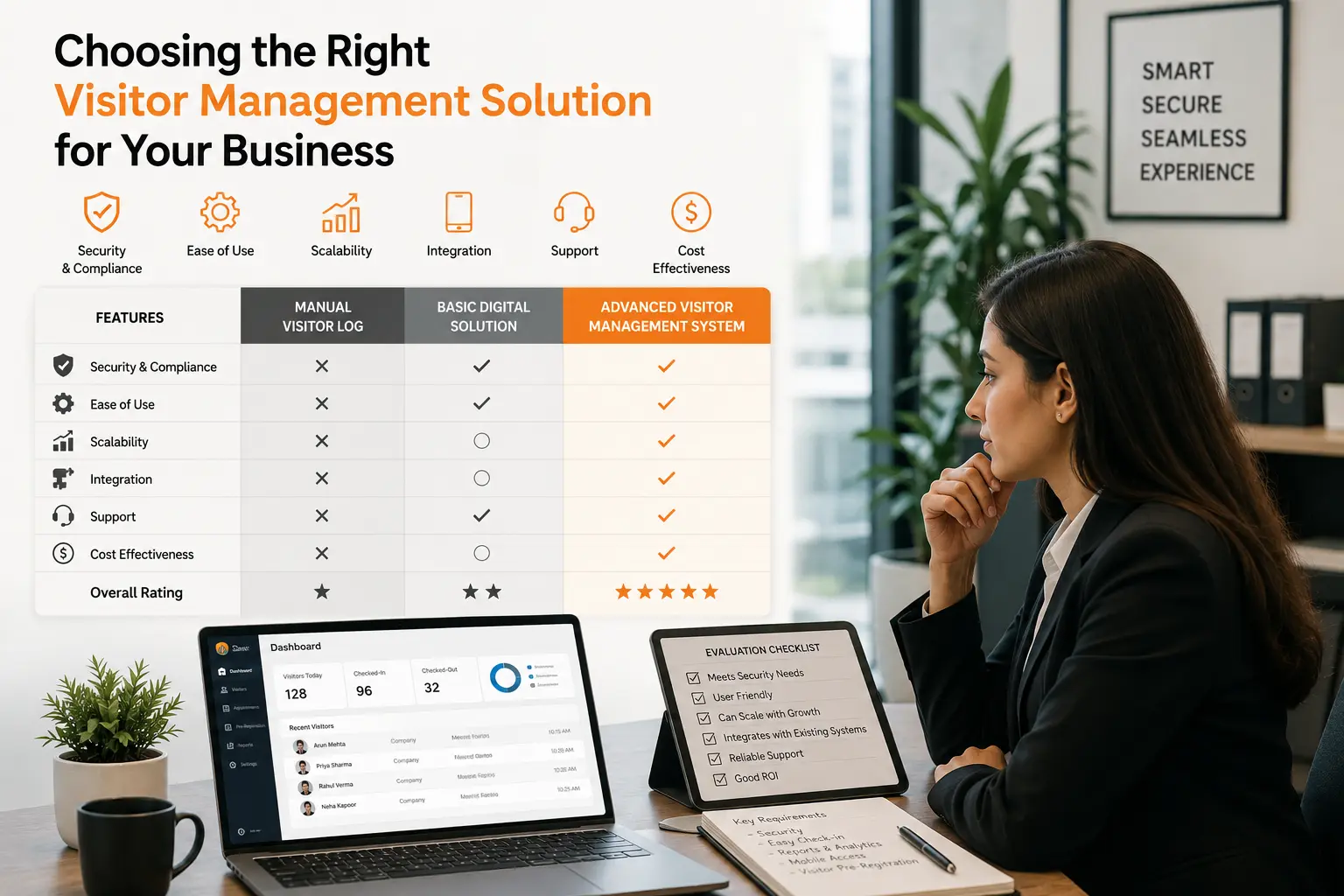
Ask these questions before you buy:
- Does it integrate with our existing access control and calendar systems?
- Can it scale across multiple locations from one dashboard?
- What data retention and privacy controls does it offer?
- How fast is check-in during peak periods?
- Does it support the specific compliance needs of our industry?
- What does onboarding and support look like after purchase?
Why VizMan
VizMan is built for organizations that need fast, secure, and compliant visitor check-in without adding complexity for reception staff or IT teams. It combines QR check-in, digital reception, and visitor badge printing with real-time analytics and emergency roll-call reporting deployable across single sites or multi-location enterprises. For teams also managing walk-in traffic beyond visitors, VizMan's queue management system and broader workplace security tools extend the same platform further.
Ready to see it in action? Book a Demo or Start a Free Trial to explore how VizMan fits your workplace.
Conclusion
A visitor management system isn't just a digital sign-in sheet it's the front door of your security, compliance, and workplace-experience strategy. The businesses that get this right treat reception as operational infrastructure, not an afterthought. Whether you're a single-site office replacing a paper logbook or an enterprise standardizing check-in across a dozen locations, the right VMS pays for itself in security, compliance confidence, and time saved.
Talk to an Expert to find the right fit for your organization, or Download the Brochure for a full feature breakdown.